To have the "Trending Ads" page displaying correctly please make sure:
- Your browser is up to date
- You don't have any browser extension or third party software with "Ad Blocking" functionality currently running*.
* AdLock, AdGuard, Adblock Plus, AdBlock, Ghostery, uBlock - this list isn't complete, if you have any browser with similar functionality please make sure you turn it of or whitelist TrendRocket, otherwise you aren't going to be able to load and preview ads.
A brand page view consumes 1 Brand Search Credit. You will only be charged once per brand per billing period. Brand search credits don't roll over month to month if they're not used.
Brand views are separate from Trend Viability reports - you can view multiple brands, but decide to Unlock the Trend Viability Report for only some of them.
Trend Viability Reports are available only for some of our brands, but we have a team in place working around the clock to add more reports every week.
Trend Viability Reports need to be "unlocked" and they'll consume 1 Trend Viability Credit from your monthly plan allowance.
When you identify a brand where you want to gain access to some additional Marketing, Product Suppliers, Logistics and Units economy data prepared by our domain experts.
If a Trend Viability Report still doesn't exist for a brand that you're interested - you can request it and we'll include it in our project pipeline, or prioritize it if it's already there.
Great question - when you visit the brand page there is a "Track" button, once you click it the store will be included in your list of brands.
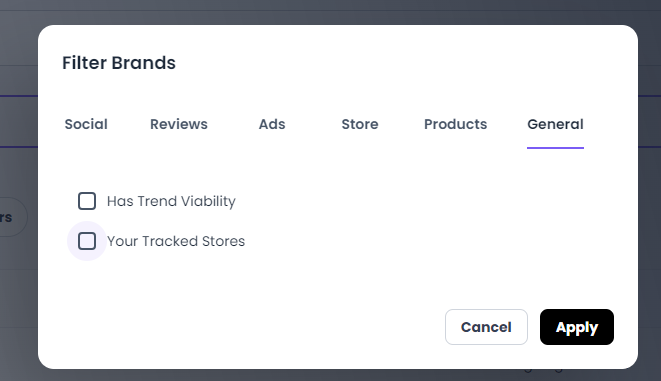
You can quickly reach the full list of Tracked stores from the Search page here, using the "Your Tracked Stores" filter and the "Apply" button.
This way you can quickly see the latest information for all brands you like.
TrendRocket.io data is all publicly available on internet web pages, social networks and multiple other data sources. Our intelligent algortithm is constantly scouring the web for any new Shopify stores and Brands with high growth potential.
Great question - we track hundreds of different metrics for each brand, the frequency of updates is proprietary. We try to update everything at least once per month, but many of our key data points are updated on a weekly or daily basis.
Trend Viability Reports are unique to TrendRocket.io, you aren't going to find them elsewhere on the internet. Each report is a carefull combination of automated and expert data collected for a brand, industry and product. Each report uncovers important opportunities, potential suppliers for the same or identical product as well as approximate shipping costs to different parts of the world and profit guidance.
New brands are added all the time, but you'll notice a significant increase in their number on a monthly basis. Only vetted brands are available for our audience, since we only filter out brands where we've collected enough data.
For the moment we're mainly focused on brands running on Shopify, we believe it's one of the best platforms on the market and used by some of the most innovative and fastest growing brands.
You can use Trend Rocket for free during the 7 day trial period on our Basic or Pro Plans, if you wish to continue using it you'll have to choose from our Monthly plans or you can get an annual plan with a significant discount.
Trend Rocket Plans
Some of our plans start with a free 7-day Trial, so you can check Trend Rocket.
If you wish to cancel your Trial or current subscription just navigate to Settings >> Billing >> Customer Portal >> click on "View Now" button.
The Customer portal will load in a new tab - you can update or cancel your subscription and card details from here.
For security reasons sessions to the Customer Portal remain active only for a short period of time, so if you leave the tab open and idle for a while you may have to repeat again the steps above to load it again.


Follow our social media.
All trademarks, logos and brand names are the property of their respective owners. All company, product and service names used in this website are for identification purposes only. Use of these names, trademarks and brands does not imply endorsement.